

Last Updated: November 22, 2026
Quick Summary
To improve posture at your desk, adjust your workstation to your body: set seat height so knees are parallel to the floor, add lumbar support, place the monitor top at eye level, keep elbows near 90 degrees, and relax shoulders down and back. Then take hourly movement breaks, since no single posture holds itself for eight hours.
- Set seat height so your knees are parallel to the floor.
- Place the top of your monitor at eye level.
- Keep elbows near 90 degrees and shoulders down and back.
- For laptops, add a separate keyboard and mouse plus a stack of books.
- Each hour, do chin tucks, shoulder squeezes, squats and a two-minute walk.
Table of Contents
- Setting Up Proper Sitting Posture at Computer Workstations
- Correct Posture at Desk With Laptop: A Budget-Friendly Fix
- Desk Posture Exercises and Movement Breaks That Help
- Frequently Asked Questions
Setting Up Proper Sitting Posture at Computer Workstations
To improve posture at desk setups, start with the workstation, not willpower: adjust equipment to the body, as OSHA’s computer workstation guidance advises. Set seat height so knees are parallel to the floor, add lumbar support, place the monitor top at eye level, keep elbows near 90 degrees, and relax shoulders down and back.
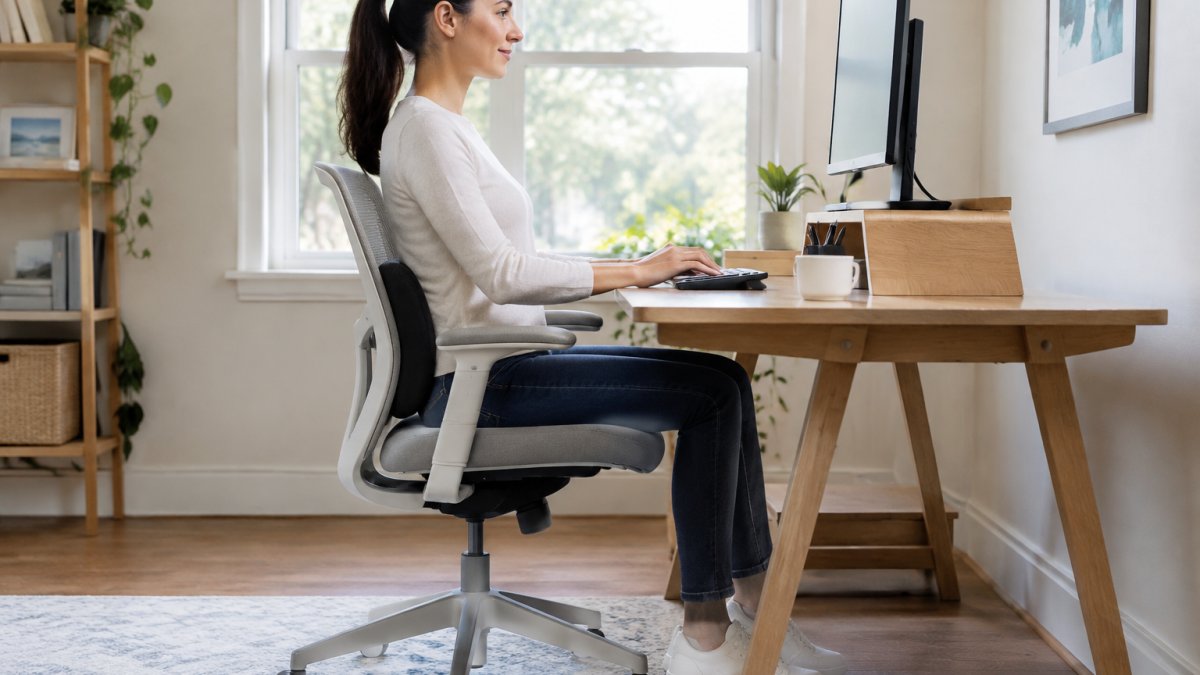
Fix the setup first and upright sitting becomes the default. To measure where your posture stands, book a 3D body posture and foot scan; for desk problems tracing back to a curved spine, explore spine curvature correction.
Here are the workstation adjustments the article recommends, each tied to the body part it addresses.
| Adjustment | Target |
|---|---|
| Set seat height | Knees parallel to the floor |
| Add lumbar support | Lower back |
| Place monitor top | At eye level |
| Keep elbows | Near 90 degrees |
| Relax shoulders | Down and back |
Correct Posture at Desk With Laptop: A Budget-Friendly Fix
Laptops force a trade-off between screen height and hand position, the root of tech neck. The cheap fix: a separate keyboard and mouse plus a stack of books under the laptop. A Mayo Clinic overview of neck pain causes notes sustained forward head position loads the neck, so short, frequent resets matter more than one perfect pose. If pain lingers, contact our team.
Desk Posture Exercises and Movement Breaks That Help
No posture holds itself for eight hours; hourly movement beats any single stretch, per CDC physical activity guidance. Each hour, do chin tucks, shoulder blade squeezes, neck stretches, standing push-ups, bodyweight squats, and a two-minute walk break. Avoid overcorrecting, aim for relaxed, upright sitting, not a rigid military pose. If pain returns, pain management may help, and our informational videos walk through posture and movement.
Desk posture improves when setup, breaks and habits align. If pain, stiffness or numbness keeps returning, a consultation with a qualified professional can help identify the cause. Advanced Rehabilitation Clinics of Texas offers 3D body posture and foot scans, pain management and bilingual services. Contact the clinic for details on scheduling a consultation.
Frequently Asked Questions
How often should I take breaks to improve posture at my desk?
A practical rule is to stand and move for two to three minutes every 30 to 45 minutes of sitting. Set a timer or use a phone reminder so the break actually happens. During each break, do a shoulder blade squeeze, a gentle chin tuck, or a short walk to the water cooler. Regular movement breaks reduce the stiffness that builds during long sitting sessions and make it easier to hold an upright position when you return to your chair.
Can a desk posture corrector fix years of slouching?
A desk posture corrector can act as a reminder to keep your shoulders back, but it does not strengthen the muscles that hold you upright. Lasting change comes from an ergonomic workstation setup, consistent desk posture exercises, and frequent movement breaks. If you have chronic neck or back pain, a brace alone is unlikely to solve it. A professional assessment can identify whether muscle weakness, joint restriction, or another issue is driving the slouching.
What is the proper sitting posture at a computer?
Sit with feet flat on the floor, knees roughly parallel to the hips, and hips pushed back into the chair. Keep a neutral spine with a small lumbar curve supported by the chair or a cushion. Shoulders should be relaxed, elbows near 90 degrees, wrists flat, and the monitor top at or slightly below eye level so the head stays aligned over the shoulders. Take short movement breaks throughout the workday to reset.

